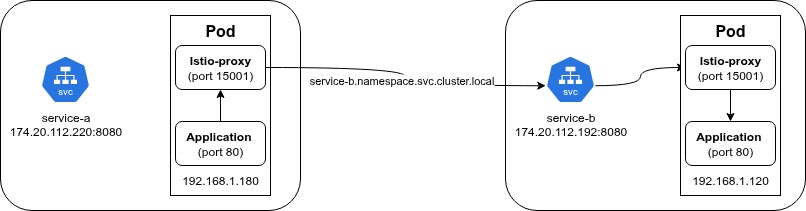
I manage a Kubernetes cluster for my client using Istio. The Application Team reported a 503 error with their pods. After investigating, I found that the error came from the istio-proxy sidecar. Please see the log below.
“message”:”API returned status: 503, body: upstream connect error or disconnect/reset before headers. reset reason: connection termination, header:map[Content-Length:[95] Content-Type:[text/plain] Date:[Wed, 25 Sep 2024 09:59:46 GMT] Server:[envoy]”
You see the the Server:[envoy] in the log, that’s the istio-proxy sidecar.
If you are running Kubernetes with Istio and suddenly see this error in your logs, this post is for you.
This error usually happens when your pods use Istio-proxy to talk to an external domain (a website or API outside your Kubernetes cluster).
If you just want the fix, you can scroll down to the Solution section. But if you want to understand why this happens, keep reading. I will explain it simply.
When you use Istio, a sidecar container (istio-proxy) is created inside your application Pod. Think of it as a middleman.
Instead of your application talking directly to the internet, it talks to this sidecar. The sidecar then forwards the request to the destination and sends the response back to your app.
The process looks like this:
google.comUsually, this works great. But sometimes, things go wrong.
There are two common reasons for this error. Both related to how connections are kept alive.
Many applications use Persistent Connections (Keep-Alive). This means your app opens a connection once and keeps using it for a long time to save resources.
However, external services like AWS Application Load Balancers (ALB) are dynamic. AWS frequently changes the public IP addresses of their Load Balancers to scale up or down.

Here is the problem:
Result: You get a 503 upstream connect error.
Your application doesn’t realize the IP has changed because it relies on the old, open connection.
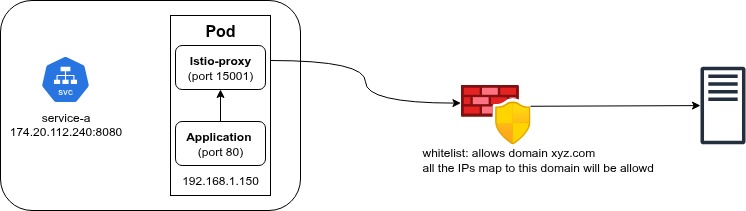
If your traffic goes through a corporate Firewall or a Security Proxy, a similar issue can happen.
Many firewalls use DNS Interception to decide if they should allow your traffic. They check the DNS record to map a Domain Name to an IP address.
These records have an expiration time (TTL). If the firewall’s record expires, but your application is still trying to send data to that specific IP (because of a persistent connection), the firewall might block it because it “forgot” who that IP belongs to.
Result: The firewall cuts the connection, and you get a 503 error.
Here are 3 ways to fix this.
You can update your application logic to perform DNS resolution more frequently. If your app refreshes the IP address often, it will switch to the new IP before the old one dies.
If you don’t need high performance, you can use short-lived connections. This means your app opens a connection, sends a request, and closes it immediately. For the next request, it resolves DNS again. This guarantees you always have the fresh IP, but it is slightly slower.
Since we are using Istio, let’s make Istio handle this for us. We need to tell Istio two things: “Refresh DNS frequently” and “Retry if it fails.”
We do this using ServiceEntry and VirtualService.
apiVersion: networking.istio.io/v1alpha3
kind: ServiceEntry
metadata:
  generation: 1
  name: ext-service-se
  namespace: <your-namespace>
spec:
  hosts:
    - host1.yourdomain.com
    - host2.yourdomain.com
  location: MESH_EXTERNAL
  ports:
    - name: service-http
      number: 80
      protocol: HTTP
    - name: service-https
      number: 443
      protocol: HTTPS
  resolution: DNS
apiVersion: networking.istio.io/v1alpha3
kind: VirtualService
metadata:
  name: host1
  namespace: <your-namespace>
spec:
  hosts:
    - host1.yourdomain.com
  http:
    - retries:
        attempts: 3
        perTryTimeout: 2s
        retryOn: 'gateway-error,connect-failure,refused-stream,5xx'
      route:
        - destination:
            host: host1.yourdomain.com
          weight: 100
      timeout: 30s
---
apiVersion: networking.istio.io/v1alpha3
kind: VirtualService
metadata:
  name: host2
  namespace: <your-namespace>
spec:
  hosts:
    - host2.yourdomain.com
  http:
    - retries:
        attempts: 3
        perTryTimeout: 2s
        retryOn: 'gateway-error,connect-failure,refused-stream,5xx'
      route:
        - destination:
            host: host2.yourdomain.com
          weight: 100
      timeout: 30s
This tells Istio: “Hey, these external domains exist, please manage the traffic for them.”
hosts: The list of external domains you want to connect to. You can put multiple hosts here.
location: MESH_EXTERNAL: Tells Istio that these services are outside of our Kubernetes cluster.
resolution: DNS: This is the important part. It tells Istio to perform DNS lookup asynchronously to get the IP addresses.
This tells Istio: “If the connection fails, please try again.”
hosts: Must match the host in the ServiceEntry. Note: Unlike ServiceEntry, you should create a separate VirtualService for each host.
retries: This is the fix for our 503 error.
attempts: 3: If the request fails, Istio will try 3 more times automatically.
retryOn: '...connect-failure,5xx': This tells Istio exactly when to retry. If it sees a connection failure (due to old IP) or a 503 error, it triggers the retry. Usually, the second attempt succeeds because it establishes a fresh connection.